Which chip is this?
You will learn
How a chip names itself in 32 bits, and how to read those bits.
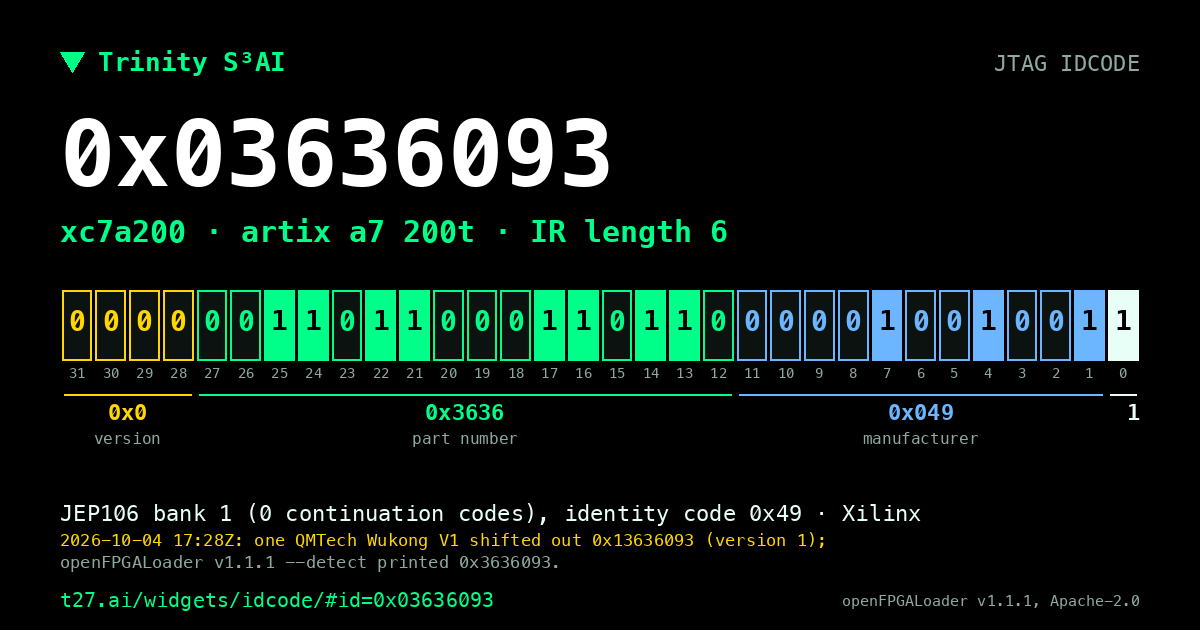
Before you load anything, you ask the board which chip it has. Over JTAG every chip answers with a 32-bit IDCODE: a version, a part number, the manufacturer and a fixed 1 in bit 0. A bitstream built for the wrong part is refused by the chip, so this is the check that saves you an afternoon. The decoder splits the bits into those four fields and looks the part up in openFPGALoader's own table.
Try it
Click the bench preset, then flip one bit of the part number and see which device it would be.
All lessons
Module 1 · The chip
What an FPGA is, which chip we use, and how its pins meet the board.
Module 2 · Numbers in hardware
Bits, trits and number formats, and what arithmetic costs in logic.
Module 3 · Your t27 program
Write a spec, test it, and see why compiling is not the same as being right.
Module 4 · Inside t27c
How the compiler reads a spec and what it writes, including the native t27b.
Module 5 · From spec to hardware
The Verilog t27c writes, the cells it becomes, and what one LUT does.
Module 6 · Reading synthesis
What yosys reports about your design, and which warnings matter.
Module 7 · Place, route, timing
Where the cells land on the die, and whether the clock is met.
Module 8 · The bitstream
How a routed design becomes the bits the chip loads, with no Vivado.
Module 9 · On the board
Ask the chip who it is, load the bits, and check them.
Module 10 · Lab: our own research
A number format of our own, an honest scoreboard, and a model's tables multiplied on the board.