Hello, t27
You will learn
What a t27 spec looks like, and what the compiler does with it in your browser.
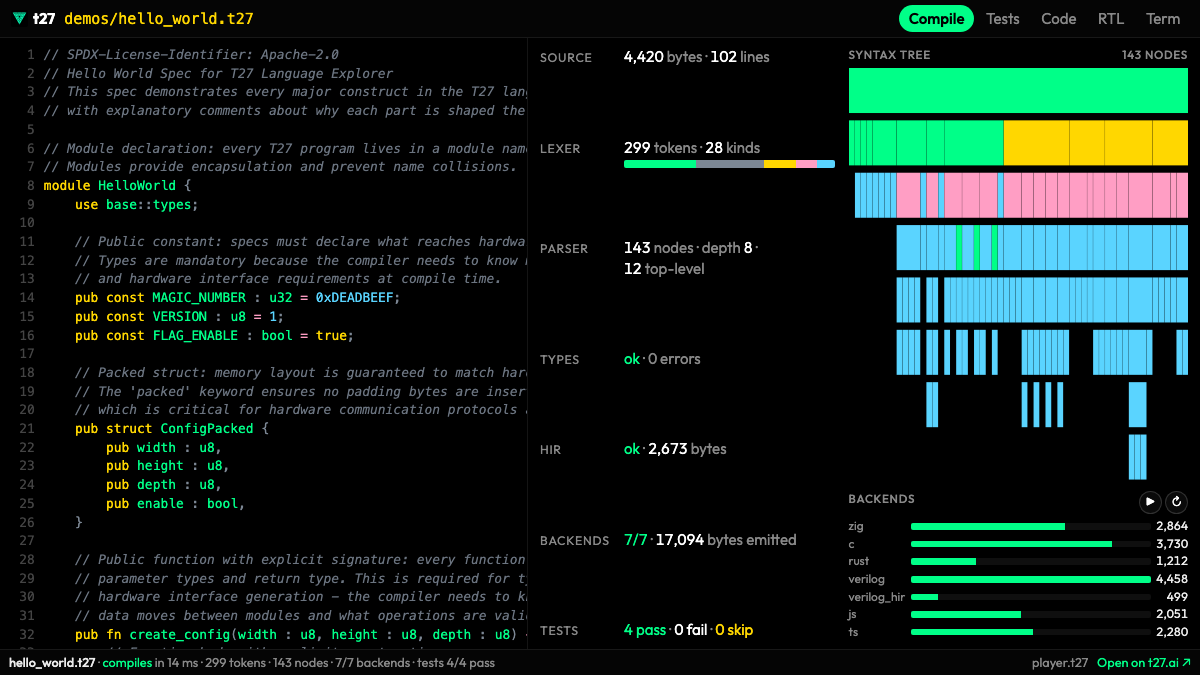
A t27 program is a spec: a module with typed constants, functions and tests. Prose lines start with a semicolon at the start of a line. The player below runs the real t27 compiler, built to WebAssembly, inside your browser: it reads hello_world.t27, runs its tests and writes code for seven backends. Nothing is installed and nothing is sent anywhere. Open the tutorial spec under the widget and read it next to the output.
Try it
Run the tests in the player, then switch the backend and find the same function in two languages.
Open the lesson's spec in the player: specs/tutorial/02_functions.t27
All lessons
Module 1 · The chip
What an FPGA is, which chip we use, and how its pins meet the board.
Module 2 · Numbers in hardware
Bits, trits and number formats, and what arithmetic costs in logic.
Module 3 · Your t27 program
Write a spec, test it, and see why compiling is not the same as being right.
Module 4 · Inside t27c
How the compiler reads a spec and what it writes, including the native t27b.
Module 5 · From spec to hardware
The Verilog t27c writes, the cells it becomes, and what one LUT does.
Module 6 · Reading synthesis
What yosys reports about your design, and which warnings matter.
Module 7 · Place, route, timing
Where the cells land on the die, and whether the clock is met.
Module 8 · The bitstream
How a routed design becomes the bits the chip loads, with no Vivado.
Module 9 · On the board
Ask the chip who it is, load the bits, and check them.
Module 10 · Lab: our own research
A number format of our own, an honest scoreboard, and a model's tables multiplied on the board.